글

Qt 로 만들자: 간단한 MPlayer front-end MPGui
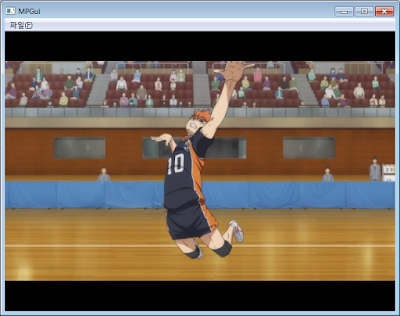
이미지
0. 들어가면서... 미루고 미루다가 이제서야 글을 쓴다. Qt 에 쓸 시간이 왜 이리도 안나는지. 이번에는 MPlayer front-end 이다. MPlayer 는 오픈소스 동영상 재생기 중에서 가장 유명한 재생기 중의 하나이다. 하지만, 명령행에서 실행되기 때문에 익숙하지 않으면 꽤 불편하다. 물론 GTK GUI 가 제공되기는 하지만, 많이 쓰이지는 않는듯 하다. 이보다는 오히려 SMPlayer 라는 front-end 가 더 유명하다. SMPlayer 라는 front-end 가 생길 수 있었던 이유는 MPlayer 에서 slave 모드라는 독특한 기능을 제공하기 때문이다. slave 모드는 MPlayer 가 독립적으로 실행되는 것이 아니라 다른 프로그램의 back-end 로 실행되는 것이다. 따라서 MPlayer 의 front-end 에서 MPlayer 의 다양한 기능을 조절할 수 있다. MPlayer 의 slave 모드를 이용해서 어떻게 MPlayer front-end 를 만들 수 있는지 간단히 알아보도록 하자. 이 과정에서 프로그램의 실행과 파이프 처리에 대해서 알 수 있을 것이다. 1. 요구사항 동영상을 Qt 창에서 재생한다 탐색을 지원한다 재생/정지를 지원한다 일시정지를 지원한다 위 기능들을 구현할 것이다. 다만, Windows 환경만을 고려한다. 다른 OS/Platform 에서도 작동할 수 있지만, OS/Platform 에 따라 추가 코드가 필요할 수 있다. Windows 용 MPlayer 실행파일은 다음 사이트에서 구한 것을 사용했다. http://mplayerwin.sourceforge.net/downloads.html 2. 코드 분석 2.1. 프로젝트 작성 프로젝트 이름: mpgui 메인 클래스 이름: MPGui 메인 클래스 유형: QMainWindow 2.2. 헤더 분석(mpgui.h) 2.2.1 헤더 파일 목록 Colored By Color Scripter ™ ...

OS/2 codes: How to control CD-ROM drives

OS/2 provides ioctl commands to control CD-ROM drives and discs. And some commands have been added with new OS2CDROM.DMD. In this article, let's research the ways to control CD-ROM drives and to utilize new commands. 1. Opening or Closing a Tray The most strange thing of OS/2 ioctl commands are CDROMDISK_CLOSETRAY . It's not possible to issue the command. Because a handle for a disc is required to issue, but there is no way to open a handle for the opened drives. This is applied to CDROMDISK_EJECTDISK . It's not possible to issue the command if a disc is not in a drive. To open and/or to close a tray, another way should be used. OS/2 provides general ioctl commands to eject and to load a media for a removable media . Ejecting is used to open a tray. Loading is used to close a tray. These commands can be issued without a handle. Therefore, it's possible to open and to close a tray even if a disc is not in the drive. Codes are like this: Colored By Color Scri...

OS/2 codes: How to manipulate FAT32 paritions

On OS/2, in general, it's possible to access to any partitions in DASD mode. This is true for FAT32 partitions. Unfortunately, however, accessing in DASD mode may not work on FAT32 partitions, especially writing to them. Instead, FAT32.IFS provides special ioctl commands. Let's see the way accessing to FAT32 partitions. 1. Accessing FAT32 partitions in DASD mode Accessing in DASD mode is the general ways on OS/2. Unfortunately, however, FAT32.IFS does not allow to access the areas beyond 2GB by default. This is true for HPFS.IFS. To overcome this problem, FAT32.IFS provides a special mode, SECTOR IO mode, like HPFS.IFS. If the sector io mode is enabled, accessing in DASD mode is performed in sectors not in bytes. To enable sector io mode, you should call DosFSCtl() , and pass 0xDEADFACE as a parameter list like this: Colored By Color Scripter ™ 1 2 3 4 5 6 7 ULONG cbData     = 0; ULONG ulDeadFace = 0xDEADFACE; ULON...

OS/2 codes: How to get information about CPUs

OS/2 provides various APIs to get information of CPU, from number of CPUs to CPU time snapshot. 1. Number of CPUs 1.1 DosQuerySysInfo( QSV_NUMPROCESSORS ) DosQuerySysInfo() returns the requested system information. If passing QSV_NUMPROCESSORS , number of CPUs are returned to the buffer. Look: DosQuerySysInfo( QSV_NUMPROCESSORS, QSV_NUMPROCESSORS,                  &ulCpus, sizeof( ulCpus )) 1.2 DosGetProcessorStatus() DosGetProcessorStatus() returns the status of the given CPU ID starting from 1. If CPU ID is valid, that is, ID-th CPU exists, it returns PROC_ONLINE or PROC_OFFLINE according to the status of that CPU. PROC_ONLINE means that the given CPU is available for running work. PROC_OFFLINE means that the given CPU is not available. Whereas the given CPU does not exist, it returns an error, ERROR_INVALID_PARAMETER . After all, number of CPUs can be caculated if counting from 1 unt...

OS/2 codes: How to check if IFS was loaded

IFS stands for Installable File System. With IFS, OS/2 can support various file systems even if they are not supported by default. What should we do to check if a specific IFS was loaded ? First of all, we can iterate all drives from A to Z, and check the attached IFS to them. However, this method cannot check IFS which is loaded but not attached yet. In addition, same IFS may be attached to the different drives. This causes extra cost when programming. To solve the above unconveniences is to check IFS directly. How ? DosFSCtl() provides such functions. DosFSCtl() provides the communication between an application and a specific IFS. If the given IFS was not loaded, it returns ERROR_INVALID_FSD_NAME , otherwise any other error codes. Using this, it's possible to check if a specific IFS was loaded. However, note that the IFS name passed to DosFSCtl() is neither the filename of the IFS nor the file-system name in the boot sector. It's the exported name by IFS. For examp...

OS/2 codes: How to emulate COPY-ON-WRITE #4 Epilogue

So far, we've researched the basic strucutre of the implementation of the copy-on-write feature. As well as, we've looked into the ways to enable copy-on-write in all threads including a main thread. Nevertheless, this approach has some limitations. Copy-on-write will not work if it is used in a thread started by custom codes using DosCreateThread() not _beginthread() it is used in an alien thread created in DLLs not linked with copy-on-write module source memory blocks are allocated malloc() not DosAllocMem() In the above first two cases, installing/uninstalling an exception handler in the context using copy-on-write manually is needed. In case of malloc(), it may be succeeded, but it's not recommended. Failure possibility is higher. Finally, copy-on-write not supported by Kernel is not optimal and may not be useful due to its efficiency. However, the fact itself that implementation of copy-on-write is possible is meaningful even if it is not actually usefu...

OS/2 codes: How to emulate COPY-ON-WRITE #3 Install exception handler

To activate the exception handler, it's needed to install it. By the way, the handler works only on the thread on which it is installed. After, we should install the handler on every threads. Let's see the way to install a handler first: EXCEPTIONREGISTRATIONRECORD regRec = { 0 }; /* Register an exception handler for SIGSEGV */ regRec.ExceptionHandler = ( ERR )sigsegv; DosSetExceptionHandler( &regRec ); EXCEPTIONREGISTRATIONRECORD is a type to register handler. Generally, it should be initialized to 0 except ExceptionHandler field. ExceptionHandler should be set to the handler to be registered. Finally, register the handler with DosSetExceptionHandler() . Here, note that EXCEPTIONREGISTRATIONRECORD variables should be placed in the stack . Uninstalling the installed handler is simple: /* Deregister an exception handler */ DosUnsetExceptionHandler( &regRec ); regRec is the variable which was used when installing the handler. DosUnsetExceptionHandler() ...

OS/2 codes: How to emulate COPY-ON-WRITE #2 Exception handler

In the previous article, we looked into a basic structure of a main function. In that, the last question was how to catch write access to the registered memory blocks. Here is the answer. It's the exception. We removed WRITE permission of the memory blocks. Because of this, writing to those blocks causes an exception, so called SIGSEGV. To catch such exceptions, we should implement exception handlers. Exception handler is like this: ULONG _System sigsegv( PEXCEPTIONREPORTRECORD p1,                        PEXCEPTIONREGISTRATIONRECORD p2,                        PCONTEXTRECORD p3,                        PVOID pv ); Out of the above parameters, p1 is the most im...

OS/2 codes: How to emulate COPY-ON-WRITE #1 main function

A basic principle of copy-on-write is the following. Remove WRITE permission of source memory blocks Create an alias memory without WRITE permission for source memory blocks Register information for these Let's see the ways to implement the above sentences. 1. Remove WRITE permission / Alter access protections of memory blocks To do this, all you have to do is calling DosSetMem() like this: DosSetMem ( p, cb, flSrc & ~PAG_WRITE )) Where p is the pointer to the source memory block, cb is the size of the blocks, flSrc is the access protection flags of those. Then, how can we get the protection flags of the source blocks ? Use DosQueryMem(): DosQueryMem ( p, &cbSrc, &flSrc ); Where p is the pointer to the memory block, cbSrc is the size to be queried. flSrc is the place where to store access flags. 2. Create an alias memory An alias memory is an memory sharing same contents with the original memory. For details, see < DosAliasMem(), ma...